
TextEdit
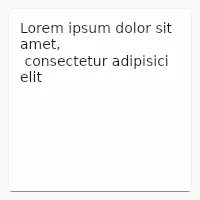
Similar to LineEdit, but can be used to enter several lines of text
Properties
Section titled “Properties”font-size
Section titled “font-size” length default: 0px
The size of the font of the input text.
font-family
Section titled “font-family” string default: ""
The name of the font family selected for rendering the text.
font-italic
Section titled “font-italic” bool default: false
The italic state of the font of the input text
has-focus
Section titled “has-focus” bool (out) default: false
Set to true when the widget currently has the focus.
enabled
Section titled “enabled” bool default: true
When false, nothing can be entered.
read-only
Section titled “read-only” bool default: false
When set to true, text editing via keyboard and mouse is disabled but selecting text is still enabled as well as editing text programmatically.
enum TextWrap default: the first enum value
The way the text wraps (default: word-wrap).
horizontal-alignment
Section titled “horizontal-alignment” enum TextHorizontalAlignment default: the first enum value
The horizontal alignment of the text.
placeholder-text
Section titled “placeholder-text” string (in) default: ""
A placeholder text being shown when there is no text in the edit field.
viewport-width
Section titled “viewport-width” length (in-out) default: 0px
The width of the viewport of the text edit.
viewport-height
Section titled “viewport-height” length (in-out) default: 0px
The height of the viewport of the text edit.
viewport-x
Section titled “viewport-x” length (in-out) default: 0px
The x position of the viewport relative to the text edit. This is usually a negative value.
viewport-y
Section titled “viewport-y” length (in-out) default: 0px
The y position of the viewport relative to the text edit. This is usually a negative value.
visible-width
Section titled “visible-width” length (out) default: 0px
The width of the visible area of the text edit (not including the scrollbar)
visible-height
Section titled “visible-height” length (out) default: 0px
The height of the visible area of the text edit (not including the scrollbar)
Functions
Section titled “Functions”focus()Call this function to focus the TextEdit and make it receive future keyboard events.clear-focus()Call this function to remove keyboard focus from thisTextEditif it currently has the focus. See also focus handling.set-selection-offsets(int, int)Selects the text between two UTF-8 offsets.select-all()Selects all text.clear-selection()Clears the selection. This function takes effect regardless of theread-onlyandenabledproperties.copy()Copies the selected text to the clipboard.cut()Copies the selected text to the clipboard and removes it from the editable area. This function takes effect regardless of theread-onlyandenabledproperties.paste()Pastes the text content of the clipboard at the cursor position. This function takes effect regardless of theread-onlyandenabledproperties.
Callbacks
Section titled “Callbacks”edited(string)
Section titled “edited(string)”Emitted when the text has changed because the user modified it
TextEdit { edited(text) => { debug("Edited: ", text); }}key-pressed(KeyEvent) -> EventResult
Section titled “key-pressed(KeyEvent) -> EventResult”Invoked when a key is pressed, the argument is a KeyEvent struct. Use this callback to
handle keys before TextEdit does. Return accept to indicate that you’ve handled the event, or return
reject to let TextEdit handle it.
key-released(KeyEvent) -> EventResult
Section titled “key-released(KeyEvent) -> EventResult”Invoked when a key is released, the argument is a KeyEvent struct. Use this callback to
handle keys before TextEdit does. Return accept to indicate that you’ve handled the event, or return
reject to let TextEdit handle it.
© 2026 SixtyFPS GmbH